HTML Explained for Beginners – The Skeleton of Every Webpage
Let’s start with something simple.
When you open a website, what are you actually looking at?
Colors? Buttons? Text? Images?
Behind all of that fancy stuff, there is one very boring but extremely important thing:
HTML.
If a webpage were a human body:
HTML would be the skeleton
CSS would be the clothes
JavaScript would be the muscles and brain
Without HTML, there is nothing to style and nothing to make interactive.
What Is HTML and Why Do We Use It?
HTML stands for HyperText Markup Language.
That sounds scary, but the idea is simple.
HTML is:
A way to describe content
A way to tell the browser what is what
Examples:
This is a heading
This is a paragraph
This is a button
This is an image
HTML does not decide:
Colors
Animations
Behavior
Its only job is structure.
HTML Is Like the Structure of a Document
Think of a Word document.
You have:
Headings
Paragraphs
Lists
Sections
HTML does the same thing — but for the web.
What Is an HTML Tag?
An HTML tag is a label that tells the browser what kind of content something is.
Example:
<p>Hello world</p>
Here:
<p>is a tagIt tells the browser: “This is a paragraph”
Tags are written using angle brackets: < >
Opening Tag, Closing Tag, and Content
Most HTML tags come in pairs.
<p>Hello world</p>
Let’s break it down:
<p>→ Opening tagHello world→ Content</p>→ Closing tag
The closing tag always has a /.
You can think of it like a box:
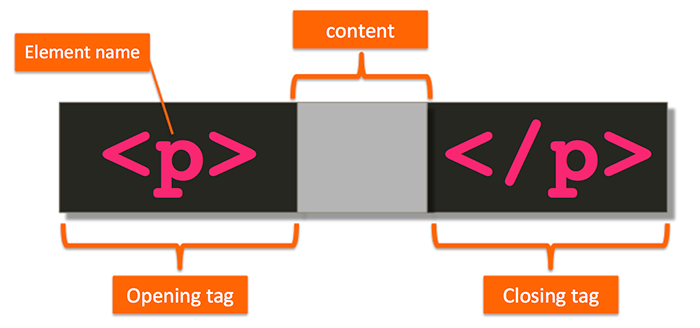


The tag opens the box, content goes inside, and the tag closes the box.
What Is an HTML Element?
This is where beginners often get confused.
Tag vs Element (Important Difference)
Tag → Just the label (
<p>)Element → The whole thing (tag + content + closing tag)
So this:
<p>Hello world</p>
is an HTML element, not just a tag.
Tag = wrapper
Element = wrapper + content inside it
Once this clicks, HTML becomes much easier.
Self-Closing (Void) Elements
Some elements don’t have content.
For example:
Images
Line breaks
Horizontal lines
Example:
<img src="cat.png">
There is:
No closing tag
No content inside
These are called:
Self-closing elements
Or void elements
Other common ones:
<br>
<hr>
<input>
Block-Level vs Inline Elements
This concept is very important, but also very simple.
Block-Level Elements
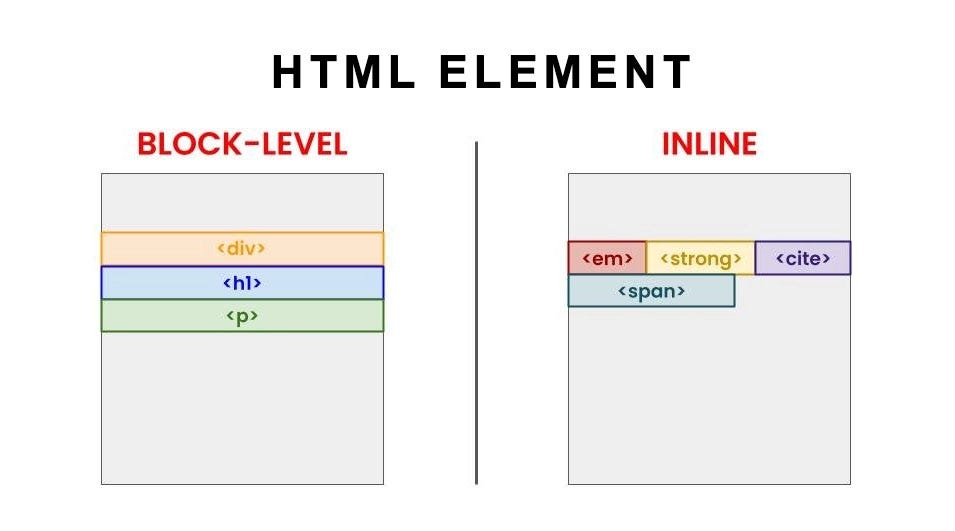
Block elements:
Start on a new line
Take full width by default
Examples:
<div><p><h1>to<h6>
<p>This is paragraph one</p>
<p>This is paragraph two</p>
They stack vertically.
Inline Elements
Inline elements:
Stay in the same line
Take only as much space as needed
Examples:
<span><a><strong>
<p>Hello <span>world</span></p>
Commonly Used HTML Tags (Beginner-Friendly)
Let’s keep this small and practical.
Headings
<h1>Main heading</h1>
<h2>Sub heading</h2>
Paragraph
<p>This is a paragraph</p>
Div (Generic Container)
<div>
  <p>Content inside div</p>
</div>
Span (Inline Container)
<span>Inline text</span>
Link
<a href="https://example.com">Visit site</a>
Image
<img src="image.png" alt="example">
That’s more than enough to start.
Think of HTML Like Writing Sentences
Here’s a simple analogy.
Words → content
Grammar → tags
Sentences → elements
Paragraphs → sections
HTML is just structured writing for browsers.
Encourage Yourself to Inspect HTML
One of the best ways to learn HTML:
Open any website
Right-click → Inspect
Look at the HTML
You’ll realize:
Big websites use the same basic tags
No magic
Just lots of nesting
This is how most developers actually learn.
Don’t Try to Memorize Everything
You don’t need to remember:
All tags
All attributes
All rules
What matters is understanding:
What HTML is for
How tags and elements work
Block vs inline behavior
Everything else comes with practice.
Final Thought
HTML is simple on purpose.
It’s not powerful.
It’s not smart.
It’s just clear.
And that’s why it has survived for decades.
Once you understand HTML as the skeleton of the web, everything else — CSS, JavaScript, frameworks — starts making much more sense.