What a Browser Actually Does After You Press Enter
Let me start with a simple question.
What really happens after you type a URL and press Enter?
Most beginners (including past-me) answer:
“The browser opens the website.”
That’s… technically true 😄
But it skips everything interesting.
A browser is not a single thing.
It’s a collection of systems working together, like a tiny operating system whose only job is to turn code into pixels.
Let’s break that journey down calmly, visually, and without scary specs.
First: What a Browser Actually Is
A browser is a program that does four big jobs:
Talks to servers over the internet
Understands HTML, CSS, and JavaScript
Figures out what should appear where
Draws pixels on your screen
That’s it.
Everything else is just how it accomplishes these jobs.
The Browser Is a Team, Not a Single Thing
Think of a browser like a small company.
Different teams handle different responsibilities.
High-Level Parts of a Browser


At a very high level, a browser has:
User Interface
Browser Engine
Rendering Engine
Networking
JavaScript Engine
You don’t need to memorize these.
Just understand the flow.
User Interface: The Part You Actually Touch
This is the visible stuff:
Address bar
Back / Forward buttons
Tabs
Reload button
The UI:
Takes your input (URL, clicks)
Passes instructions to the browser engine
That’s it.
The UI doesn’t understand HTML or CSS it just forwards commands.
Browser Engine vs Rendering Engine
This confuses almost everyone at first.
Browser Engine
Acts as the manager
Coordinates between UI, networking, and rendering
Decides what should happen next
Rendering Engine
Does the actual visual work
Converts HTML + CSS into pixels
Think of it like this:
Browser engine = project manager
Rendering engine = artist + layout designer
Networking: How the Browser Fetches HTML, CSS, and JS
Once you press Enter:
Browser engine asks networking layer
Networking layer sends requests
Server responds with:
HTML
CSS
JavaScript
Images, fonts, etc.
The browser doesn’t fetch just one file.
It fetches many resources, sometimes in parallel.
Now the Real Magic Starts: HTML Parsing
The browser receives raw HTML text.
But text alone is useless.
So the browser parses it.
What Does “Parsing” Mean? (Very Simple)
Parsing just means:
Turning raw text into structured meaning.
Simple Math Example
Expression:
2 + 3 * 4
Parsing helps understand:
*happens before+3 * 4is grouped
That grouping forms a tree structure.
Same idea with HTML.
HTML Parsing → DOM Creation
HTML:
<body>
  <h1>Hello</h1>
  <p>World</p>
</body>
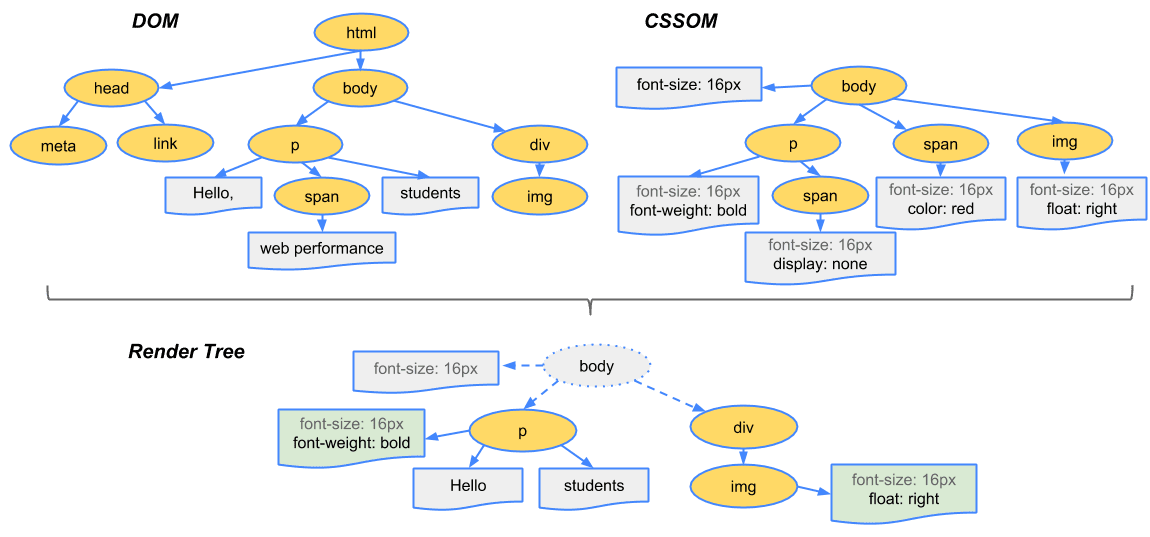
The browser turns this into a DOM tree.

DOM (Document Object Model)
A tree structure
Each HTML element becomes a node
Represents content and structure
Think of DOM as:
“What exists on the page.”
CSS Parsing → CSSOM Creation
CSS is parsed separately.
h1 { color: red; }
p { font-size: 16px; }
This becomes the CSSOM.
CSSOM
Another tree structure
Represents styling rules
Handles inheritance and specificity
Think of CSSOM as:
“How things should look.”
DOM + CSSOM Come Together → Render Tree
Now the browser combines them.

Render Tree
Contains only visible elements
Has structure (from DOM)
Has styles (from CSSOM)
This tree answers:
“What should actually be drawn?”
Layout (Reflow): Figuring Out Positions and Sizes
Next step: layout, also called reflow.
Here the browser decides:
Width
Height
Position (x, y)
How elements affect each other
Example questions:
How wide is this div?
Where does this text wrap?
What happens if the screen size changes?
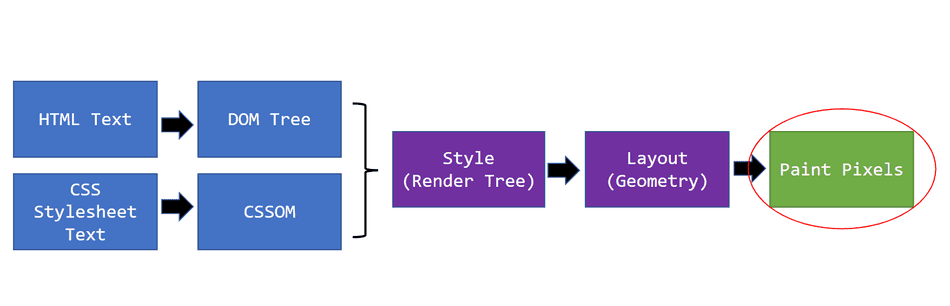
Painting: Turning Layout into Pixels
Now the browser starts painting.

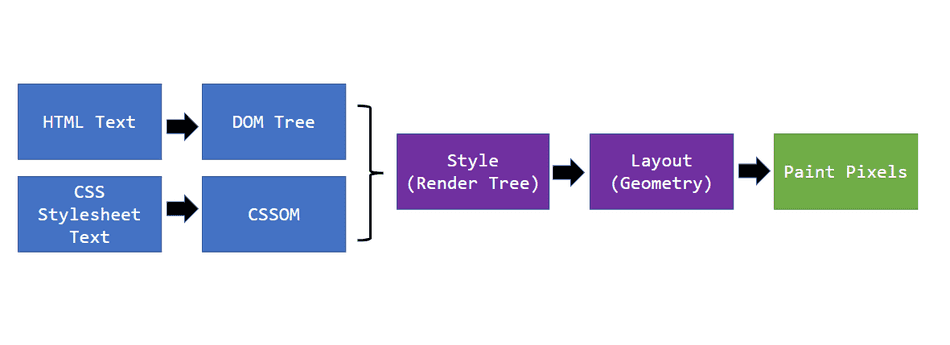
Painting includes:
Colors
Text
Borders
Shadows
Images
Nothing is interactive yet — this is just drawing.
Display: Pixels Hit Your Screen
Finally:
Painted layers are sent to the screen
Pixels light up
You see the page
🎉 Website loaded.
The Full Flow (Big Picture)


URL entered
Network requests
HTML → DOM
CSS → CSSOM
DOM + CSSOM → Render Tree
Layout
Paint
Display
Important Beginner Reassurance
You do not need to remember:
All steps
All names
All trees
What matters is understanding the story:
Text → Structure → Style → Layout → Pixels
That mental model alone puts you ahead of most beginners.
Final Thought
A browser is not magic.
It’s a pipeline.
It takes:
Text from the internet
Breaks it into meaning
Organizes it into trees
Calculates layouts
Paints pixels
Once you see that flow, frontend development stops feeling random — and starts feeling logical.