TCP Explained Like You’re Sending a Message That Must Reach Safely
When I first learned about TCP, someone told me:
“TCP is a reliable protocol.”
Cool.
But why does it need to be reliable?
What happens if it isn’t?
So let’s start there — before TCP existed.
What Happens If Data Is Sent Without Rules?
Imagine this scenario.
You’re sending a long message to your friend, but instead of sending it as one piece, it gets broken into small parts:
Part 1
Part 2
Part 3
Part 4
Now imagine:
Part 2 never arrives
Part 4 arrives before Part 3
Part 1 arrives twice
Your friend receives:
Part 1
Part 4
Part 1 again
Part 3
No context. No order. Missing information.
That’s exactly what would happen on the internet without rules.
Networks are unreliable:
Packets can be dropped
Packets can arrive late
Packets can arrive out of order
This chaos is the problem TCP was designed to solve.
What Is TCP and Why Is It Needed?
TCP (Transmission Control Protocol) is a set of rules that makes sure:
Data reaches the destination
Data arrives in the correct order
Missing data is re-sent
Both sides agree when communication starts and ends
In short:
TCP turns an unreliable network into a reliable communication channel.
Without TCP:
Websites would load half-broken
File downloads would be corrupted
Logins would randomly fail
Problems TCP Is Designed to Solve
TCP exists because the internet has problems.
Here’s what TCP actively handles for you:
❌ Data loss
❌ Out-of-order delivery
❌ Duplicate packets
❌ Unclear start and end of communication
And it does this without the application (like your browser) worrying about it.
Before Sending Data, TCP First Says Hello
TCP does not just start sending data.
First, it checks:
“Are you there?”
“Are you ready to talk?”
“Can we agree to communicate?”
This process is called the TCP 3-Way Handshake.
What Is the TCP 3-Way Handshake?
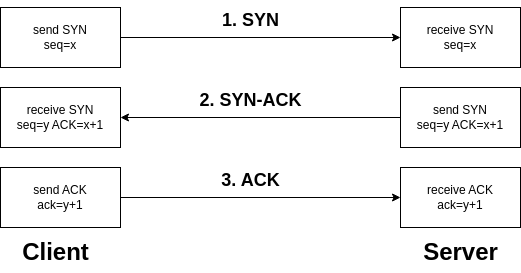
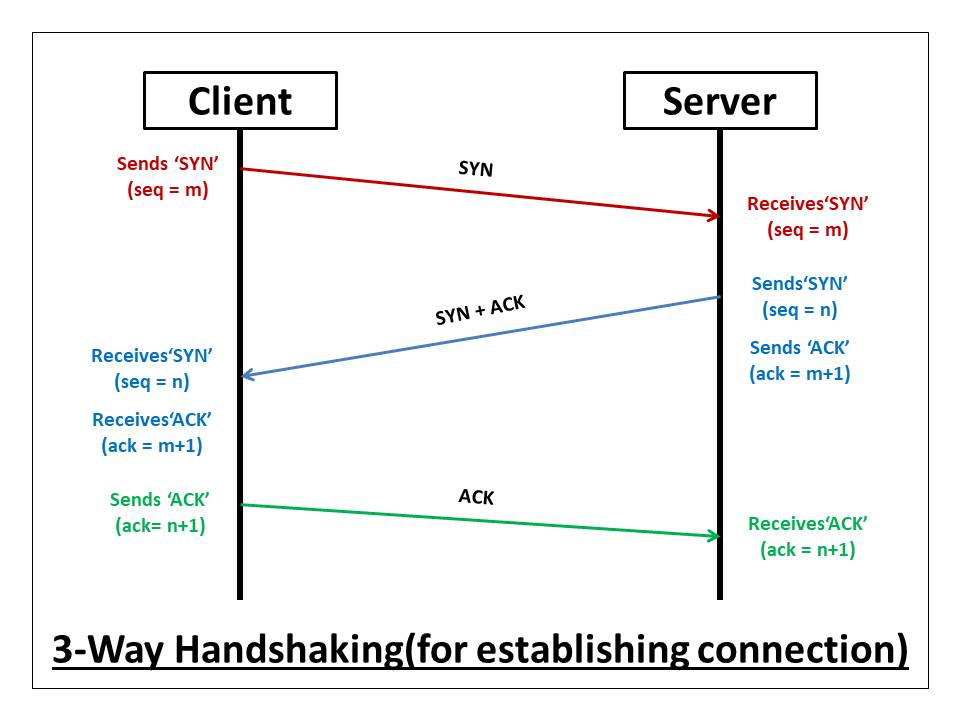
The 3-way handshake is how a TCP connection is established.
Think of it like starting a phone call.
You don’t just start talking — first, both sides confirm the call is connected.
TCP 3-Way Handshake Explained as a Conversation
Let’s make this human.
Step 1: SYN – “Can We Talk?”
Client → Server
“Hey, I want to start a connection.”
This message is called SYN (synchronize).
It means:
I want to communicate
Let’s synchronize our connection
Step 2: SYN-ACK – “Yes, I’m Ready”
Server → Client
“Yes, I’m here. I got your request.”
This message is SYN-ACK:
SYN → I also want to synchronize
ACK → I acknowledge your request
Step 3: ACK – “Great, Let’s Start”
Client → Server
“Perfect. Let’s begin.”
This final ACK confirms:
Both sides are ready
Connection is officially established
After this — data transfer can begin.
Why 3 Steps? Why Not Just 1?
Because TCP wants certainty.
Each step confirms something:
Client exists
Server exists
Both can send and receive data
No assumptions. No guesswork.
How Data Transfer Works in TCP (High Level)
Once the connection is established, TCP starts sending data in chunks.
Each chunk has:
A sequence number
An expectation of acknowledgment
You don’t need to memorize numbers — just understand the idea.
Sequence Numbers (Explained Simply)
Think of sending pages of a book.
Each page is numbered:
Page 1
Page 2
Page 3
TCP does the same:
This is chunk 1
This is chunk 2
This is chunk 3
If chunk 2 is missing, TCP knows exactly what to resend.
Acknowledgements (ACKs)
For every chunk received, the receiver replies:
“I received everything up to number X.”
This is called an ACK.
It’s TCP’s way of saying:
“I got it”
“You can send the next part”
How TCP Ensures Reliability and Order
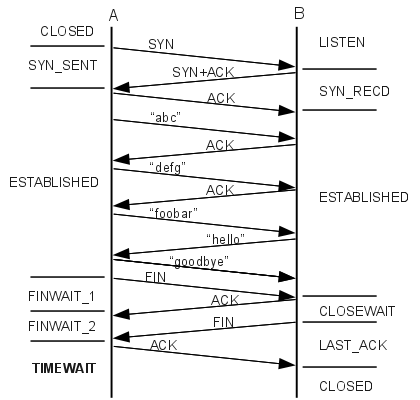
Here’s the magic combo TCP uses:
Sequence numbers → maintain order
ACKs → confirm delivery
Timers → detect packet loss
Retransmission → resend missing data

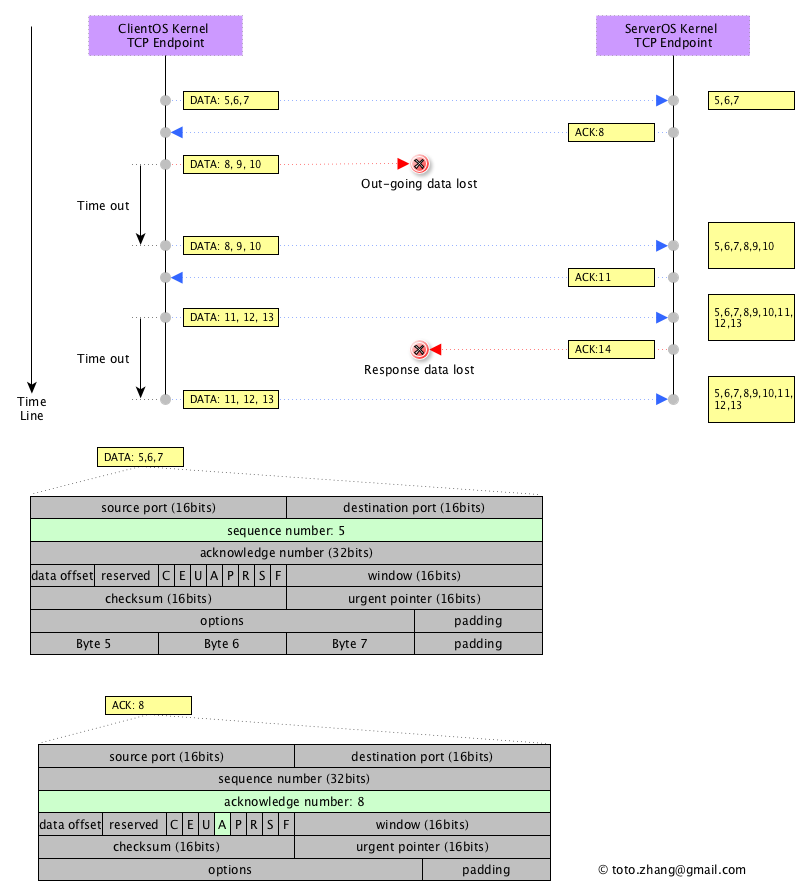
If something goes missing:
TCP notices
TCP waits
TCP resends
All silently. Automatically.
What Happens If a Packet Is Lost?
TCP doesn’t panic.
Sender sends data
ACK never arrives
Timer expires
Sender resends the data
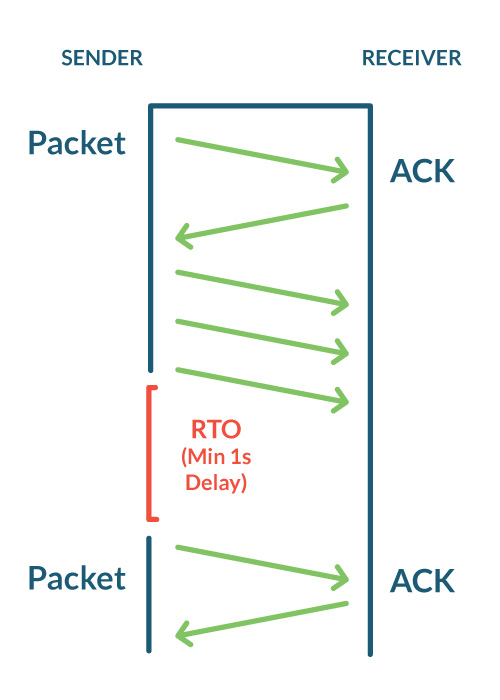
Your app never knows.
Your browser never cares.
TCP quietly fixes the problem.
How a TCP Connection Is Closed
Just like starting a connection is controlled, ending it is also controlled.
TCP does not ghost.
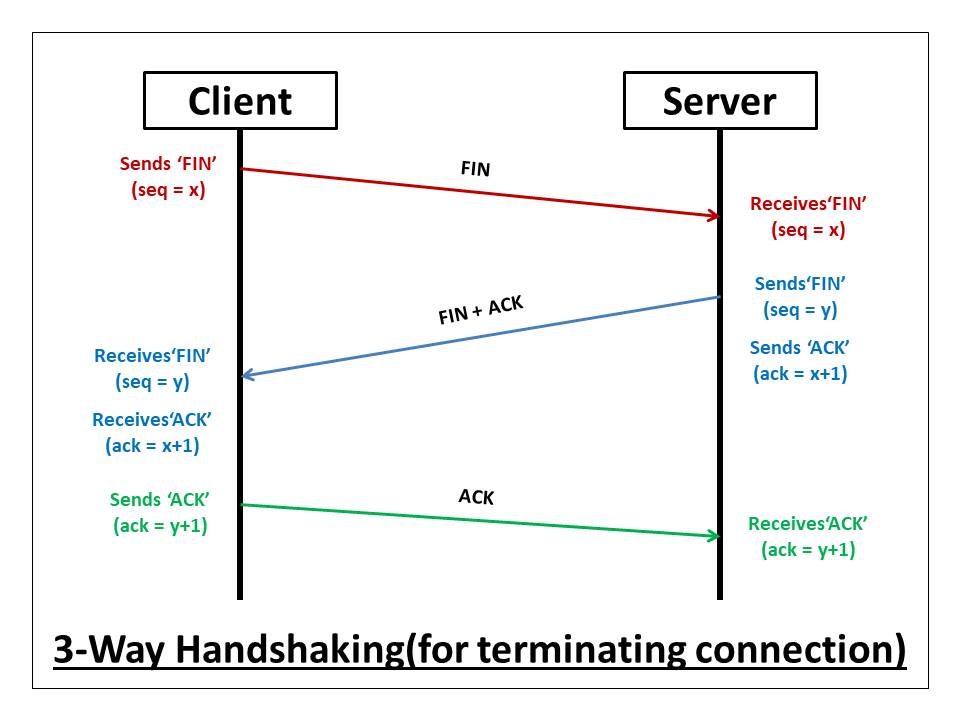
TCP Connection Termination (FIN and ACK)
Think of it as a polite goodbye.
One side sends FIN
“I’m done sending data.”
Other side replies with ACK
“I got your message.”
Other side sends its own FIN
Final ACK confirms closure
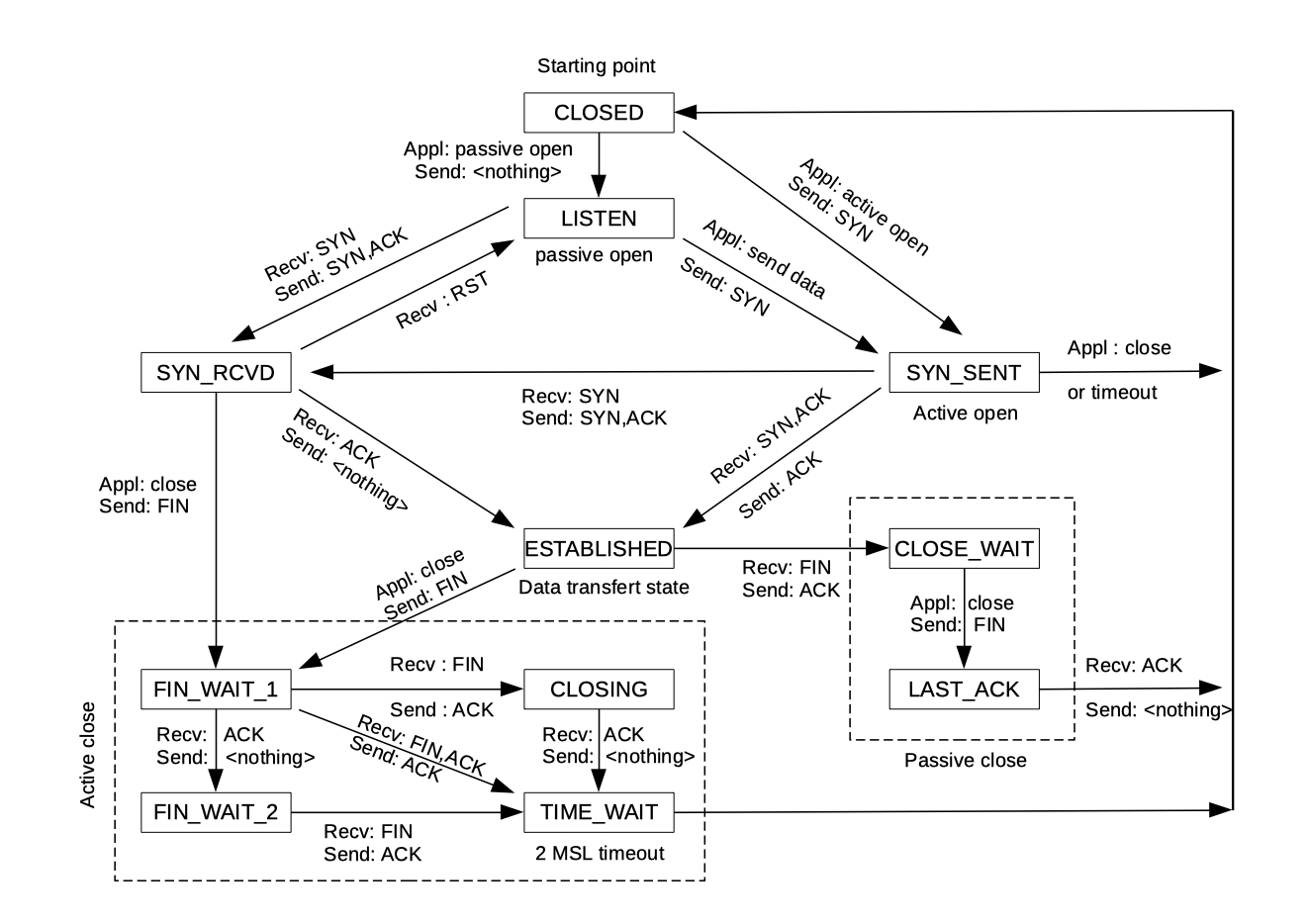
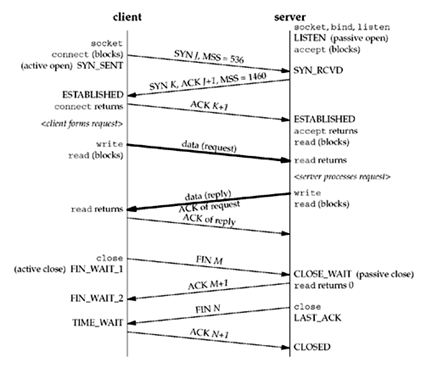
Only after this:
Resources are freed
Connection is fully closed
The Full TCP Lifecycle

Connection established (3-way handshake)
Data transferred reliably
Connection closed gracefully
Why TCP Is Trusted Everywhere
TCP is boring — and that’s its superpower.
It’s used when:
Data must be correct
Order matters
Reliability is non-negotiable
Websites, emails, APIs, databases — all trust TCP to do the right thing.
Final Thought
TCP is not fast.
TCP is not fancy.
TCP is responsible.
It checks.
It confirms.
It retries.
It cleans up after itself.
And because of that — the modern internet actually works.