TCP, UDP, and HTTP Explained Like You’re New to the Internet
When I first started learning how the internet works, I had this very naive assumption:
“If I send data from my laptop, it just… goes to the other laptop.”
No rules. No structure. Just vibes.
Turns out — the internet is extremely rule-driven.
Without rules, data would be chaos. Half messages. Missing files. Broken videos. Angry developers.
So today, let’s talk about three of the most important rulebooks of the internet:
TCP
UDP
HTTP
No deep internals. No packet diagrams that make your head hurt.
Just behavior, use cases, and real-life analogies.
The Core Idea: The Internet Needs Rules to Send Data
The internet is basically this:
Millions of devices
Talking to millions of other devices
At the same time
Over unreliable networks
Data can get:
Lost
Delayed
Duplicated
Delivered out of order
So we need rules that decide:
How data is sent
How fast it’s sent
What happens if something goes wrong
That’s where TCP and UDP come in.
What Are TCP and UDP? (Very High Level)
Think of TCP and UDP as two different delivery styles.
TCP: “Safety First”
TCP is careful, reliable, and a bit slow.
It makes sure:
Data arrives
Data arrives in order
Missing data is re-sent
UDP: “Speed Over Safety”
UDP is fast, lightweight, and risky.
It:
Sends data
Doesn’t check if it arrived
Doesn’t care about order
Both are valid. Both are necessary.
TCP Explained Using a Courier Analogy
Imagine you’re sending an important document via a courier.
Here’s what TCP does:
“Hello, are you ready to receive my package?”
“Yes, I’m ready.”
“Cool, I’ll send it in parts.”
“Did you get part 1?”
“Yes.”
“Did you get part 2?”
“No.”
“Okay, resending part 2.”
That’s TCP.
It’s slow because it keeps checking, but it’s safe because nothing goes missing silently.
UDP Explained Using a Live Announcement Analogy
Now imagine a stadium announcement:
“THE MATCH STARTS IN 5 MINUTES”
The speaker doesn’t care:
Who heard it
Who missed it
Who joined late
That’s UDP.
Data is sent once, fast, and without confirmation.
If you miss it — too bad.
Key Differences Between TCP and UDP
| Feature | TCP | UDP |
| Reliability | Guaranteed | Not guaranteed |
| Order of data | Maintained | Not maintained |
| Speed | Slower | Faster |
| Error recovery | Yes | No |
| Connection setup | Required | Not required |
When Should You Use TCP?
Use TCP when correctness matters more than speed.
Examples:
Loading a website
Logging into an app
Sending emails
Downloading files
APIs and databases
If even one byte missing breaks the experience — TCP is the right choice.
You’d rather wait 200ms more than load a broken page.
When Should You Use UDP?
Use UDP when speed matters more than perfection.
Examples:
Video streaming
Voice calls
Online gaming
Live broadcasts
DNS queries
If you miss one frame in a video call, your life goes on.
If your voice glitches for half a second, nobody dies.
Speed wins here.
Real-World TCP vs UDP Examples
| Use Case | Protocol | Why |
| Website loading | TCP | Pages must load correctly |
| TCP | Data loss is unacceptable | |
| Video calls | UDP | Speed > perfection |
| Online games | UDP | Latency kills gameplay |
| File downloads | TCP | Corruption is not okay |
Where Does HTTP Fit Into All This?
Here’s where beginners often get confused.
“Is HTTP the same as TCP?”
No.
Very no.
HTTP is NOT a transport protocol
HTTP is an application-level protocol.
That means:
TCP/UDP decide how data moves
HTTP decides what the data means
Think of It Like This
TCP → The road
HTTP → The delivery instructions
HTTP says things like:
“GET this page”
“POST this form”
“Here is the response”
But HTTP does not care how packets travel.
That job belongs to TCP.
Relationship Between TCP and HTTP
This is the layering:


HTTP sits on top of TCP
TCP ensures reliable delivery
HTTP assumes TCP will handle failures
So when you open a website:
TCP connection is created
HTTP request is sent over that connection
HTTP response comes back
TCP ensures everything arrives safely
Why HTTP Does NOT Replace TCP
This is an important mindset shift.
HTTP:
Does NOT retransmit packets
Does NOT ensure ordering
Does NOT handle packet loss
If HTTP tried to do TCP’s job, the internet would collapse into spaghetti code.
Each layer has one responsibility — and that’s why the system scales.
Common Beginner Confusion
❌ “HTTP and TCP are the same”
✅ HTTP uses TCP
❌ “TCP is only for websites”
✅ TCP is for any reliable communication
❌ “UDP is bad because it loses data”
✅ UDP is intentionally risky for speed
Visualizing TCP vs UDP Communication
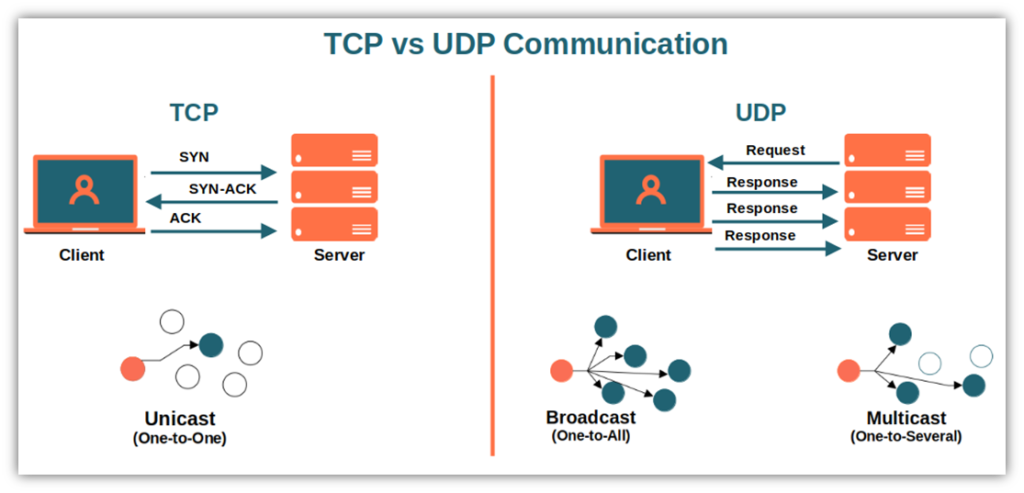
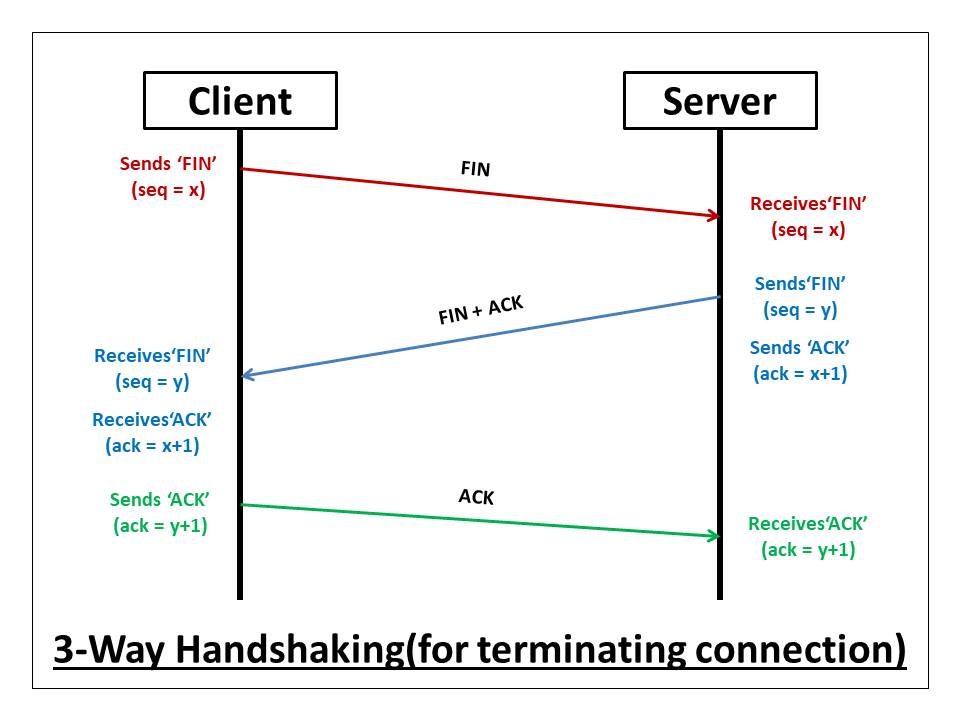
TCP = handshake → data → confirmation
UDP = send → hope → move on
Final Thought
The internet isn’t magic.
It’s just layers of rules working together.
TCP makes sure data arrives safely
UDP makes sure data arrives fast
HTTP gives meaning to the data
Once you understand behavior instead of memorizing definitions, networking stops being scary and starts being logical.